
Stats Final Project: Deck of Cards
This is my final project for Udacity’s Introduction to Descriptive Statistics course, but with a twist.
The assignment was to start with a deck of regular playing cards and take at least 30 samples of three cards each from the deck, record the cards drawn and return the cards to the deck after each sample.
I’ve also been taking the Data Analyst with Python Career Track at DataCamp, so I thought I’d use Python with the Pandas library for this project. After all, who wants to spend all that time manually taking and recording 30 samples when Python can do all this in an instant?
What follows, then, is a report on my statistical findings for this assignment as well as a description of how I achieved the results using Python with the Pandas library.
Deck of Cards
There are many ways to simulate sampling from a deck of cards in Python, but I wanted to practice using Pandas, so my solution used Pandas’ DataFrames to model the deck of cards and the samples I took. I quickly threw together a spreadsheet with columns for suit, card and value with each row representing a single card. Here I could have built the deck in Python, but it’s easy to import a CSV file into Pandas using the from_csv() method of DataFrame. With that done, it was simple to create a histogram of the deck as per the project’s instructions.
 1# create deck of cars from spreadsheet
 2deck = pd.DataFrame.from_csv("card_deck.csv", index_col=None)
 3
 4# re-order columns (of course I could have ensured that the
 5# spreadsheet columns were in the correct order, but it's not
 6# uncommon to have fix your data with Pandas, so why not
 7# practice?
 8cols = ['Card', 'Suit', 'Value']
 9deck = deck[cols]
10
11# Deck statistics
12deck_std = deck['Value'].std()
13deck_mean = deck['Value'].mean()
14
15# Create the histogram of values in the deck
16deck_hist = deck.plot(kind='hist', grid=True, legend=False)
17plt.xlabel('Card Value (Suits = 10 pts)')
18plt.title('Distribution of Values in Deck of Cards')
19deck_hist.xaxis.set_minor_locator(MultipleLocator(1))
20plt.savefig(charts_dir + 'deck.svg')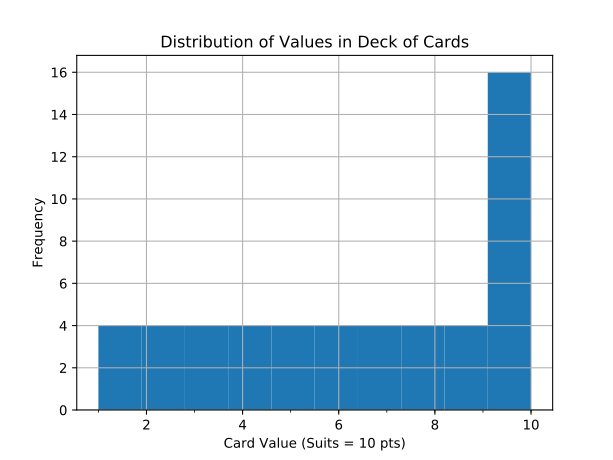
- Deck mean: 6.54
- Deck standard deviation: 3.18
Cards are valued from one (Ace) to ten with suits also taking a value of ten, so there’s nothing surprising about this histogram. You can see that there are four cards for each value (one for each suit) except for ten, which has sixteen values (one ten and three face cards for each of the four suits). Although the assignment didn’t ask fo it, I included the deck mean and standard deviation. Knowing the deck mean will serve as a sanity check when looking at the summary statistics later, and I’ll need the standard deviation to calculate the summary statistics’ standard error. You can see the code for calculating these two values on lines 12 and 13 in the code sample above.
Random samples of three cards
Turns out taking a random sample of cards is as easy as using the sample() method on the deck data structure (see line 10, below).
 1def run_draws(deck, num_draws):
 2  """ Takes a deck of cards and draws given number of cards \
 3  num_draws times. Returns a DataFrame with a rows for the \
 4  sum and mean of each sample."""
 5
 6  # Create a dataframe to hold the samples
 7  samples_summary = pd.DataFrame(columns=['Draw Number', 'Sum', 'Mean'])
 8
 9    for item in range(num_draws) :
10        draw = deck.sample(3)
11        draw_number = item + 1
12
13        for row in draw :
14            draw['Draw Number'] = draw_number
15
16        # Create Summary of draw
17        value_sum = draw['Value'].sum()
18        value_mean = draw['Value'].mean()
19        draw_summary = []
20        draw_summary.append({'Draw Number': draw_number, 'Sum': value_sum,
21                              'Mean': value_mean})
22
23        samples_summary = samples_summary.append(draw_summary, ignore_index=True)
24        samples_summary.to_csv(saved_draws)
25    return samples_summary
You get a different result each time you run the program since the sample() method on DataFrame draws a random sample of a given size each time it’s called. This behaviour is part of the design, but in order to write up this report, I needed a set of data that didn’t change every time I ran the program. So at the end of the run_samples() function seen above, I save the results to a file and then, in the following code, I run run_samples() if the file isn’t yet present. Otherwise I open the file using from_csv()
1# run sample_count samples
2
3if saved_draws.is_file():
4    samples_summary = pd.dataframe.from_csv(saved_draws)
5else:
6    samples_summary = run_draws(deck, sample_count)
It’s worth noting here that the value of sample_count is 100. the assignment asked for at least 30 samples and with the computer doing all the grunt work, why not take 100?
Here are the first few rows of the resulting samples_summary data structure. I’ve omitted the first column, which is a unique index for each row.
| Draw Num | Sum | Mean |
|---|---|---|
| 1 | 19 | 6.333333 |
| 2 | 27 | 9.000000 |
| 3 | 16 | 5.333333 |
| 4 | 16 | 5.333333 |
| 5 | 25 | 8.333333 |
Next, I combined the deck histogram with the sample sums histogram to make comparisons between them easier.
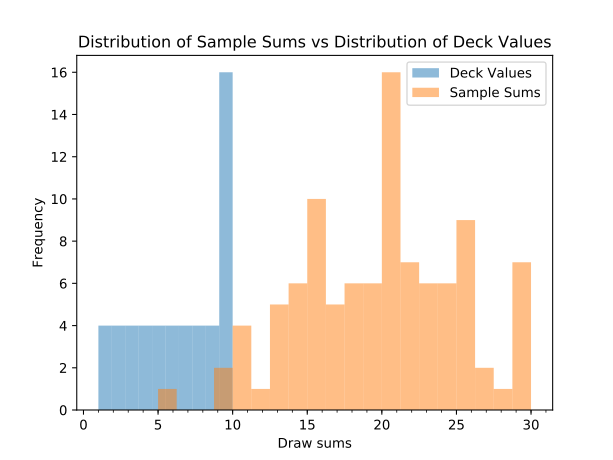
Unsurprisingly, the sample sums histogram looks different from the histogram for the deck of cards. The sample sums histogram has two samples of ten and one of five, so there is very little overlap between the two histograms. As seen below in the Descriptive Statistics section, because tens are so prevalent in the pack, the mean and medium of sums is near 20.
Descriptive Statistics
I calculated descriptive statistics for these samples using, as per the assignment, at least two measures of central tendency and two measures of variance. These calculations were simple to perform:
 1# Deck sample sums statistics
 2sums_mean = samples_summary['Sum'].mean()
 3sums_median = samples_summary['Sum'].median()
 4means_mean = samples_summary['Mean'].mean()
 5sums_q1 = samples_summary['Sum'].quantile(0.25)
 6sums_q3 = samples_summary['Sum'].quantile(0.75)
 7sums_iqr = sums_q3 - sums_q1
 8sums_std = samples_summary['Sum'].std(ddof=1)
 9sums_std = samples_summary['Sum'].std(ddof=1)
10sums_ste = (deck_std / math.sqrt(3))
Measures of central tendency
- mean of means: 6.58
- Mean of sums: 19.74
- Median of sums: 20.00
Note that I have taken the mean of sample means. This number should be approximately the same as the population mean (the deck mean), which was 6.54. So, with a mean of msample means of 6.58, we’re within four 100th. Good enough for government work, as they say.
Measures of variance
- Interquartile Range of sums: 7.25
- Standard deviation of sums: 5.38
- Standard error of sums: 1.84
Making Estimates
Finally, we were asked to make a couple of estimates about future draws.
Between which two values will you find 90% of the values?
For my first stab at answering this question, I used the z-table provided by the course to find the values at the 5th and 95th percentiles and used the resulting z-scores to determine that 90% of values lie between 10.92 and 28.61
Another way of arriving at these values is to use DataFrame’s quantile()
method as follows:
1sums_lq = samples_summary['Sum'].quantile(0.05)
2sums_hq = samples_summary['Sum'].quantile(0.95)
Using the quantile() method puts 90% of the values between 11.00 and
29.00. These are fairly close to those arrived at with the z-table, but not exact matches. The z-table I was using was only accurate to two decimal places, so that might account for some of the difference. I’m not sure what kind of rounding the quantile() method uses–perhaps I’ll explore the source code for that answer.
What is the approximate chance of obtaining value of at least 20?
The z-score of 20 would be 0.048, so using the z-table, I found that you’d have about a 52% of drawing three cards that added up to at least 20.
Final thoughts
As a side note, I publish this blog using Markdown, so I used the pystache templating library to output my stats as follows:
 1output_data = { 'deck_mean': deck_mean, 'deck_std': deck_std,  'sums_mean':
 2               sums_mean, 'sums_median': sums_median, 'sums_iqr':
 3               sums_iqr, 'sums_std': sums_std, 'sums_ste':
 4               sums_ste, 'means_mean': means_mean, 'sums_90_lower': sums_90_lower,
 5               'sums_90_upper': sums_90_upper, 'sums_lq': sums_lq, 'sums_hq':
 6               sums_hq }
 7
 8# Round the floats in output data to 2 decimals
 9output_data = {k:'{0:.2f}'.format(v) for k, v in output_data.items()}
10
11# charts_dir is not a number so it would make the formatting operation above crash.
12output_data['charts_dir'] = charts_dir
13
14output = '''
15
16## Deck of Cards
17
18<img src="{{charts_dir}}deck.svg" ></figure>
19
20Mean of card values: {{deck_mean}}
21
22Standard deviation of card values: {{deck_std}}
23
24## Random samples of three cards
25
26<img src="{{charts_dir}}sums.svg"></figure>
27
28...(rest of the text not included)
29
30'''
31
32renderer = pystache.Renderer()
33print(renderer.render(output, output_data))
With that print statement on line 33, I printed out the rendered skeleton of the report to the console so I could use Bash’s I/O redirection to save it to a file. This output template could have been saved as a separate file and if I was developing a reporting system, I’d write some reusable code to allow this, but this quick and dirty approach worked for my current purposes.
There are likely other approaches to creating reports with Pandas data and plots and I’ll be exploring them as I continue my studies. As you an see above, I posted the plots as SVG images. It would be worth exploring Javascript libraries for future web-based projects. And for a PDF report, I’d take yet a different approach.
One other thing I would have liked to do is mark individual statistics such as the mean directly on the histograms. A quick search shows this is possible, so I’ll look into it next project.
I’m continuing on with Udacity’s free stats courses. I just started their Introduction to Inferential Statistics. As for DataCamp, I’ll also continue with their Python curriculum. One downside of their course offerings is that they don’t assign projects, but I’ll continue to use what I’m learning there to do new data projects.
